Does this opening need to be closed?
A scan may contain missing surface data, but a sheet, cutaway or open-ended part can have intentional boundaries. Hole filling creates new geometry across an opening; it cannot recover the original scanned shape from absent data.
MeshRepair has two separate controls: Fill small holes attempts eligible patches, while Require closed surface rejects a result that still has boundary edges. Enabling the second control alone does not fill holes.
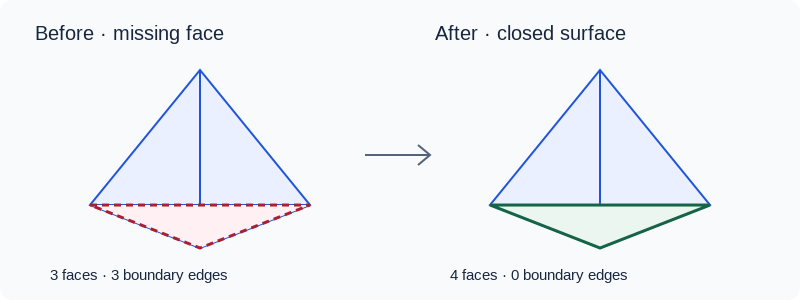
Worked example: a missing triangular face
- Download the open tetrahedron (OFF) and select it in the workspace.
- Enable Fill small holes. Set Maximum patch area to 0.5.
- Open More control and enable Require a closed surface. Leave simplification off and keep Preserve surfaces.
- Run repair and compare the original and repaired views. Inspect the saved-output diagnostics, then download the STL/PLY.
| Check | Input | Saved output |
|---|---|---|
| Faces | 3 | 4 |
| Boundary edges | 3 | 0 |
| Eligible holes | 1 | 0 |
| Valid with closed surface required | No | Yes |
Choose the area threshold in your mesh's units
The threshold uses squared coordinate units. If coordinates represent millimeters, the area is in square millimeters. Files without unit metadata are interpreted in their existing coordinates; MeshRepair does not infer or convert units.
Scaling every coordinate by ten multiplies patch area by one hundred. The example's 0.5 threshold would therefore become 50 after that scale change. Choose a threshold from the opening you intend to close, then inspect the generated patch.
Eligibility uses a conservative triangle-fan area around each boundary loop. It is not a hole diameter or a guaranteed minimum patch area. Concave and nonplanar openings can have a larger fan area than their apparent opening.
Why might a hole remain?
- The loop exceeds the area threshold or the supported patch limit of 512 boundary edges.
- The boundary does not form a simple eligible loop, or the surrounding surface has other unresolved defects.
- A candidate patch fails geometric or topology validation.
With closed surface required, a remaining opening causes failure. Increasing the threshold also permits larger surface changes, so inspect the model before trying it. Use the non-manifold guide if connectivity is the underlying problem.
Watertightness is one requirement for many printing workflows. It does not establish correct wall thickness, scale, material behavior or slicer compatibility. Choose STL or PLY and inspect the saved file in your slicer.
Fill an eligible hole ↗Mesh hole-filling questions
Does Require closed surface fill all holes?
No. It checks the result for boundary edges. Fill small holes is a separate operation limited by the patch-area setting and supported loop conditions. If a required opening remains, the run fails. Use the closed-surface troubleshooting steps.
Does a watertight result guarantee a successful print?
No. Also review intersections, intended shape, physical dimensions, walls and the slicer preview. Follow the pre-slice checklist after saving and, if necessary, converting the output.