An intersection is more than a connectivity error
A triangle can cross another triangle even when their edge and vertex neighborhoods are individually manifold. Geometric checks are needed as well as topology checks. Coplanar overlaps matter too; ordinary shared edges and allowed point contacts are different cases.
The default Preserve surfaces policy retains surface semantics and may reject intersections it cannot resolve. Solid union is an explicit choice for overlapping closed solids: it removes internal surfaces to keep their combined solid. It changes what geometry survives.
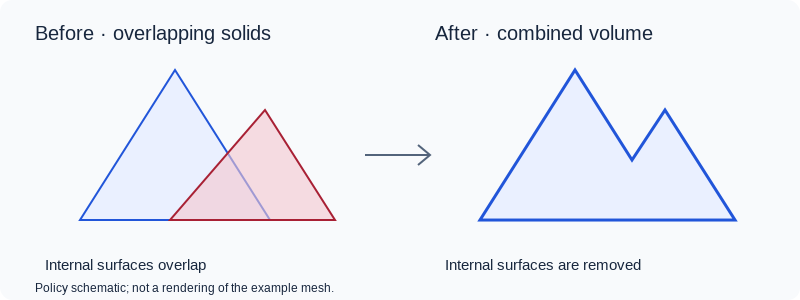
Worked example: union two closed solids
- Download the overlapping tetrahedra (OFF) and open them in the workspace.
- Open More control and choose Union closed solids as the intersection policy. Leave hole filling and simplification off.
- Run repair. Check the saved-output intersection count and inspect the combined shape.
| Check | Input | Saved output |
|---|---|---|
| Faces | 8 | 16 |
| Intersecting triangle pairs | 3 | 0 |
| Components | 2 | 1 |
| Boundary edges | 0 | 0 |
Download the independently checked union (PLY). The higher face count comes from retessellating the intersection. Repair can add triangles even when you have not requested simplification.
A useful failure: crossing open sheets
Download two crossing triangles (OFF). With Preserve surfaces, this example is rejected: cutting the triangles into pieces does not eliminate the invalid geometric crossing. No repaired mesh is published.
Solid union is not a shortcut for this case because the input surfaces are open. Decide which sheet to retain or remodel the intersection in your source application. The diagnostic JSON is available even when there is no mesh download.
Review the shape as well as the validity result
A zero intersection count does not prove that an automatic operation preserved your intended design. Inspect internal cavities, separate components and thin features. Outward orientation is a separate setting; use it only when every closed component is meant to face outward.
For openings, read Fill holes and check watertightness. To reduce a valid result afterward, see mesh simplification. Decimation only starts after repair has passed its checks.
Review an intersecting mesh ↗Self-intersection questions
Can simplification fix intersecting surfaces?
In this tool, repair must pass before optional simplification begins. A lower face target does not bypass unresolved intersections. Read the repair troubleshooting guide to choose the next action.
Can I use Solid union on an open mesh?
No. This option requires closed input and can remove internal surfaces. For an open mesh, inspect the crossing and decide which surface should remain in the source editor. Filling unrelated small holes does not necessarily make the entire mesh suitable for union.